Just about anything. Things that may help me as well as others. Stuffs about Internet, computers, softwares, freewares, portable applications, bookmarklets, photo editors and manipulation softwares, digital arts and photography...
Wednesday, December 30, 2009
Friday, October 23, 2009
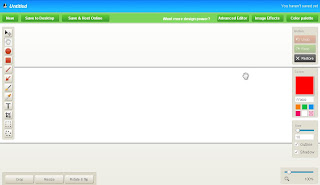
Screen Capture Bookmarklet for Google Chrome and Firefox
Here's another useful bookmarklet you can use in Google Chrome as well as Firefox. It let's you capture screenshots and edit it before saving. You can also add texts, arrows, draw, change colors, move, crop, resize, flip add effects much more like editing images in those photo manipulation softwares. When saving you can choose whether to save it on your desktop or save and host it online but you have to register for an account to do that (registration is absolutely free).
Thursday, October 22, 2009
Screenshot Captor - Freeware screen capture software
Screenshot Captor is a freeware program used in making screenshots on your computer. Most screen shot softwares I formerly used where although free but with some disabled features, while some you can use as trial softwares and locks up after the alloted time.
- Screenshot Captor however is different from other similar programs simply because it's loaded with features.
- It is optimized for taking screenshots very easily.
- Screenshot Captor however is different from other similar programs simply because it's loaded with features.
- It is optimized for taking screenshots very easily.
Monday, September 28, 2009
Philippines appeals for help due to typhoon "Ketsana" onslaught
In Behalf of my fellow Filipinos in the affected areas by the typhoon (Ketsana) or "Ondoy" it's local name, I appeal to everybody for any help you can give. Food, water, old clothes, medicines, or money donations will be very much appreciated.. Please inquire in areas near you in your respective countries how you can help.. Thank You very much in advance...
Sunday, May 24, 2009
Dictionary Bookmarklet for Firefox and Chrome
Very usefool tool for bloggers and/or readers alike.. You can look up meaning of words with just a few clicks..
To install just drag this Dictionary to your bookmarks bar..
Tip: In using.. If you want to stay on the page your on, you have to right-click on the bookmarklet and open it in a new tab or a new window..
To install just drag this Dictionary to your bookmarks bar..
Tip: In using.. If you want to stay on the page your on, you have to right-click on the bookmarklet and open it in a new tab or a new window..
Wednesday, May 20, 2009
EBooster 2.02 Build 424 - Turn your USB Flash Drives into RAM

With EBooster you can turn your USB thumb drives into PC memory. You don't have to purchase a new one and spend hundreds to upgrade your PC's RAM. Add more speed to your PC's without any hardware upgrades. EBooster speeds up your PC and improves application responsiveness by using your Flash memory and free RAM as an extra layer of performance-boosting cache for your PC. You can use up to four flash drives to speed up your system. That's like just a quarter of what you will spend for a single memory.
Download 1.13MB
Download 1.13MB
Tuesday, May 19, 2009
Save Page as PDF bookmarklet for Chrome and Firefox
Originally for Chrome. Tested it on Firefox and works just fine.. Very useful if you happen to have interesting articles or web pages that you want as reference, or you simply want to have a copy of. This way you can view it offline..
To install drag this Save Page as PDF to your bookmarks bar.
* Also tried it on Opera and works fine..
To use in Opera.. Just copy the script and add it as a bookmark cause Opera don't permit drag and dropping bookmarks..
Subscribe to:
Posts (Atom)