Showing posts with label *Blogger hacks. Show all posts
Showing posts with label *Blogger hacks. Show all posts
Tuesday, January 12, 2010
Hide LinkWithin On Your Homepage In Blogger
Link Within is a free and very useful widget bloggers can have on their blogs to display related posts with a thumb-shot of an image if any, just below every posts. This simply means more page views for you and a little convenience for your readers simply because they won't have to search for the related topics on your site. It will be displayed right at the end of the post. Blogger Blogspot does not offer a feature like this unlike WordPress. So Blogspot bloggers usually use this plugin to display related post on their blogs.
However, users of this widget don't really have much control on where to position it within their posts. It will
always position itself at the bottom of every post. And show up on your home page even if you have


Wednesday, January 6, 2010
Blogger Post Summaries the easy way
Post summary is very useful if you write very long posts and you wanted to display just short teaser sentences on your homepage and it also brings a bit of ease to your visitors cause they won't have to scroll so far down just to scan your home page.
Unfortunately Blogger don't have this feature built in previously, so blogspot bloggers resort to one solution, modifying their template or "hack" as more commonly known in blogosphere. To do this you have to at least know a little about coding html/css, or at can really follow the instruction on the tuts. You have to add some
Monday, January 4, 2010
Easily replace the boring old Blogger Comment form with a feature rich plugin
The default Blogger comment form is a feature poor platform often with so many restrictions that visitors are discouraged to leave any comment. Unlike other blog platforms like Wordpress and others whom already have nice comment forms with some cool features and plugins so easy to use some don't even require a knowledge in HTML coding to implement.
For Blogger Blogspot users there are some ways to improve the looks and functionality of their comment forms. However, doing it's frustrating and requires a bit of HTML coding experience or you really have to
For Blogger Blogspot users there are some ways to improve the looks and functionality of their comment forms. However, doing it's frustrating and requires a bit of HTML coding experience or you really have to
Monday, April 13, 2009
How To Add 3 Column Footer In Blogger
Before anything else, download and save a copy of your current template in case you decide to revert back to your current one..
First we must remove all the widgets/contents of your footer. Or if you want to keep them put it temporarily on your side bar like I did..
Go to customize/ edit HTML then scroll down until you see these line:
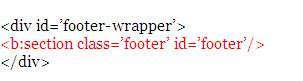
First we must remove all the widgets/contents of your footer. Or if you want to keep them put it temporarily on your side bar like I did..
Go to customize/ edit HTML then scroll down until you see these line:

Subscribe to:
Posts (Atom)